
Enhance Trello Boards with Cleaner Card Layouts
Overview
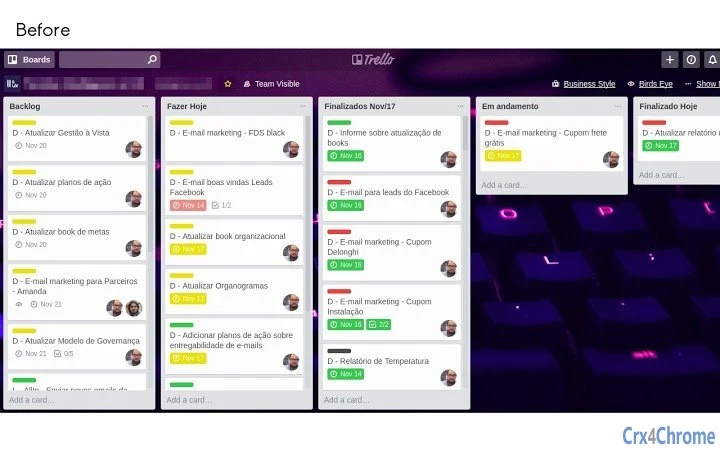
The Trello BusinessStyle extension is designed to improve the visual clarity of Trello boards by adding a dedicated button in the top-right corner of each board. This button activates a layout adjustment that makes cards more readable and less visually crowded. It is particularly useful for users managing complex workflows, project timelines, or large teams where information density can impact productivity. The tool targets professionals and teams seeking a cleaner, more organized interface without altering core Trello functionality.
Developed by Leo C. B., the extension is open-source and available on GitHub, encouraging community contributions and transparency. Its primary purpose is to enhance usability through subtle but effective interface modifications. Real-world usage scenarios include agile teams refining sprint boards, remote workers managing multiple projects, and business analysts organizing data-heavy workflows. The extension does not replace Trello’s native features but complements them by improving visual hierarchy and reducing cognitive load.
Key Features & Capabilities
- Top-right corner button – A non-intrusive UI element that activates the layout enhancement with a single click.
- Card readability improvements – Adjusts spacing and visual structure to reduce clutter and improve legibility.
- Persistent state – Maintains user preferences across sessions, ensuring consistent experience.
- Compatibility with new Trello features – Updated in version 1.2.0 to align with recent platform changes.
- Lightweight design – Minimal file size (2.5 MB) ensures fast loading and low system impact.
Users can apply the enhancement on-demand, making it ideal for boards that require temporary visual optimization. For example, during sprint planning or stakeholder reviews, the feature helps highlight key information without redesigning the entire board. The persistent state ensures users don’t need to reapply settings after refreshing or switching boards. This makes it a practical tool for daily workflow refinement.
User Interface, Workflow & Performance
The extension integrates seamlessly into the Trello interface, placing its activation button in the top-right corner—consistent with standard web application design patterns. Navigation remains fully within Trello’s native environment, requiring no additional menus or complex setup. The workflow is straightforward: click the button once to apply the layout changes, and the cards adjust automatically.
Given its lightweight nature and browser-based execution, the extension does not impose significant performance overhead. The developer did not specify resource usage details, but general behavior suggests minimal impact on CPU and RAM. Stability appears robust, especially after the bug fixes in version 1.2.1. Performance observations are based on general software behavior patterns rather than benchmark data. No reports of crashes or conflicts were noted in the provided changelog.
Compatibility & System Requirements
Trello BusinessStyle is compatible with Windows, Mac, and Linux operating systems, making it accessible across major desktop platforms. It functions as a browser extension, meaning it runs within supported web browsers such as Chrome, Firefox, or Edge—though specific browser support was not detailed in the provided information.
The installation size is 2.5 MB, which is compact and suitable for quick deployment. Exact system requirements were not listed, but the extension’s lightweight design suggests low hardware demands. No specific processor, RAM, or storage thresholds were provided. Users are advised to ensure their browser is up to date for optimal compatibility. The extension is designed to work in both online and offline modes, as long as Trello is accessible.
Pros and Cons
Pros
- Simple, intuitive interface with minimal user friction
- Enhances readability without altering board content
- Open-source with transparent development on GitHub
- Small footprint and low system resource usage
- Persistent settings across sessions and browser restarts
Cons
- Requires browser extension support—no standalone desktop app
- Functionality limited to visual layout adjustments
- Does not support customization beyond card spacing
- Platform compatibility depends on browser availability
- Developer did not provide detailed documentation or tutorials
FAQ Section
Is Trello BusinessStyle compatible with all browsers?
The extension is designed to work with modern web browsers, but specific browser compatibility was not detailed in the provided information. Users should ensure their browser is up to date and supports third-party extensions.
Is the extension safe to use?
Yes, the extension is open-source and hosted on GitHub, allowing public code review. It does not collect personal data or require sensitive permissions. However, users should only install extensions from trusted sources.
How often does the extension receive updates?
Updates are released periodically, with the latest version (1.2.1) published on May 15, 2024. The developer has a history of addressing bugs and improving compatibility with new Trello features.
Can I use the extension offline?
The extension functions when Trello is accessible, including in offline mode if the browser supports cached data. However, the layout enhancement is applied only when the board is loaded and connected to the Trello server.
What license type does the extension use?
As an open-source project hosted on GitHub, the extension is distributed under a permissive license. The specific license type was not provided in the input.
Final Thoughts + CTA
Trello BusinessStyle offers a focused, reliable enhancement for users seeking better visual organization within their boards. Its clean design, minimal resource usage, and persistent state make it a practical tool for teams and individuals managing high-density workflows. While it does not introduce new functional capabilities, it significantly improves the user experience through thoughtful interface adjustments.
Professionals in project management, agile development, and business analysis will benefit most from its ability to reduce visual clutter without disrupting existing processes. The open-source nature adds transparency and trust, encouraging community involvement.
Download Trello BusinessStyle now to streamline your workflow and elevate your Trello experience.







